
Approve and pay bills across every Xero company.
One list of every supplier bill in every Xero organisation you run. Approve in bulk, pay with a CIMB, Hong Leong or JomPay bank file instead of retyping, and let intercompany recharges draft themselves.
What Bills Hub is, and why finance teams use it
How one list, bulk approval, bank files and automatic recharges take the retyping out of paying bills across many Xero companies.
Xero works one company at a time. Your finance team doesn't.
A holding company, a management company and an Sdn Bhd per outlet means a separate Xero organisation for each, and paying bills turns into a lot of clicking and copying.
A login per company
To see what's due you open each Xero organisation in turn, then add it up in a spreadsheet.
Payments typed twice
Bills approved in Xero are keyed into the bank's portal by hand, payee by payee. That's where money goes to the wrong account.
Costs in the wrong company
When the management company pays an outlet's electricity, someone has to remember to raise the recharge in both sets of books.
Everything between "bill received" and "bill paid"
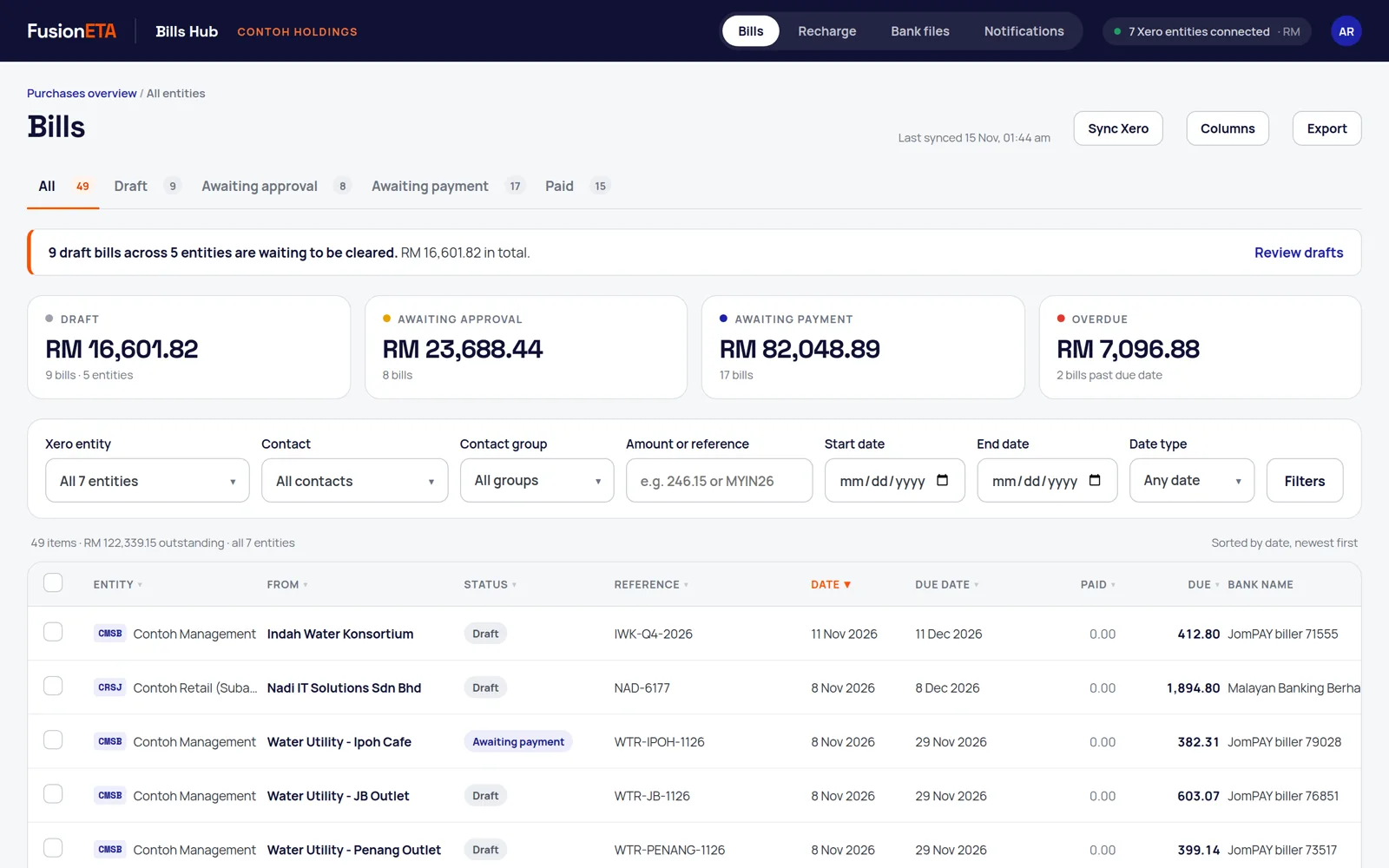
Every bill, every company, one list
Bills Hub reads supplier bills from each Xero organisation you connect and keeps them in sync every 15 minutes.
- Tabs for Draft, Awaiting approval, Awaiting payment and Paid, with totals and overdue amounts
- Filter by company, supplier, Xero contact group (for example all landlords), amount, reference or date
- Choose and reorder columns, including each supplier's bank; the export follows what's on screen
- Each company keeps its own base currency, and totals never add ringgit to dollars
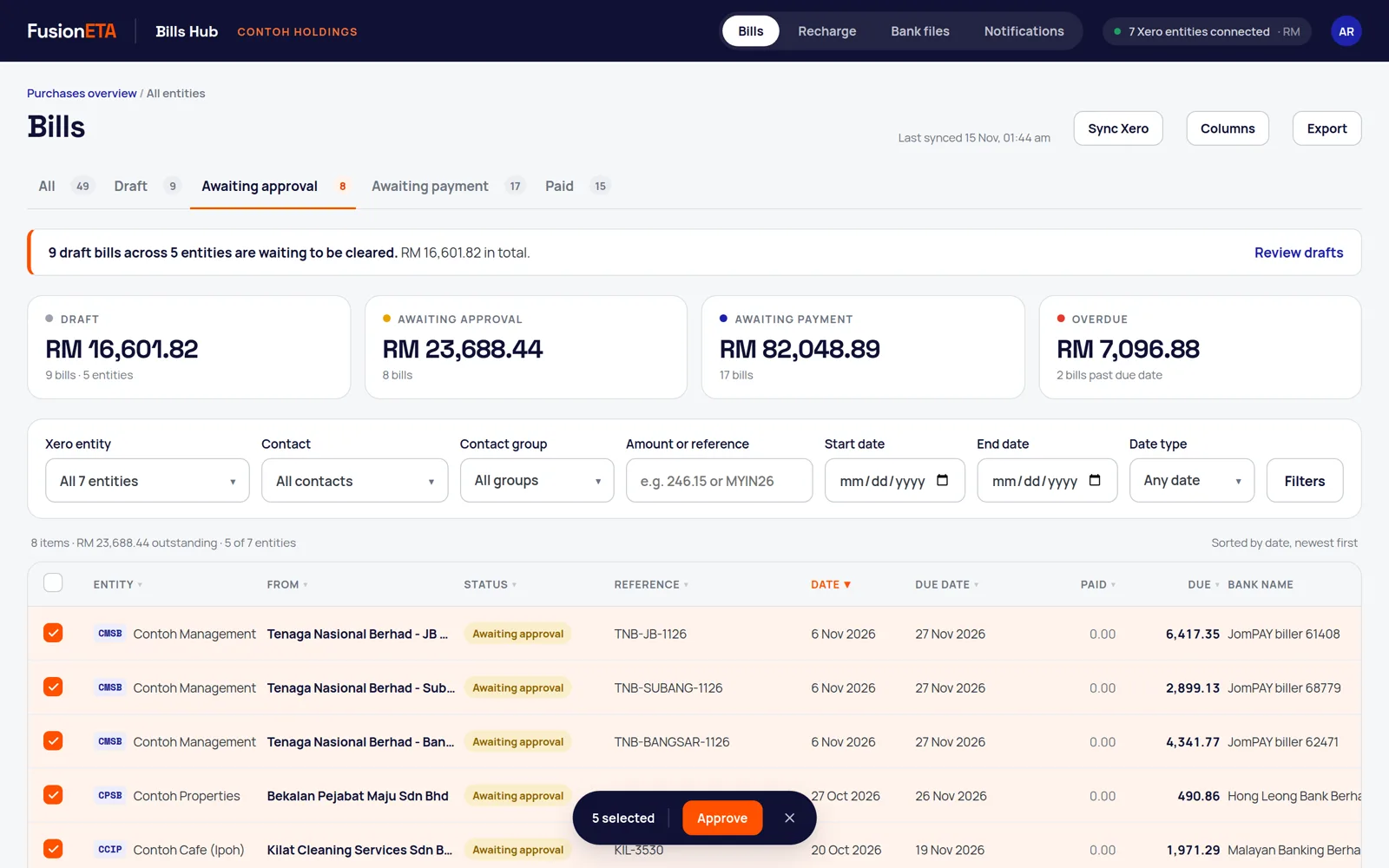
Submit and approve in bulk, across companies
Tick the bills, press Approve. Bills move from Draft to Awaiting approval to Awaiting payment in Xero without opening each organisation.
- Each bill is checked against its Xero status before it moves
- One rejection never stops the rest of the batch
- A daily WhatsApp digest makes sure drafts don't sit unnoticed
A bank file instead of retyping
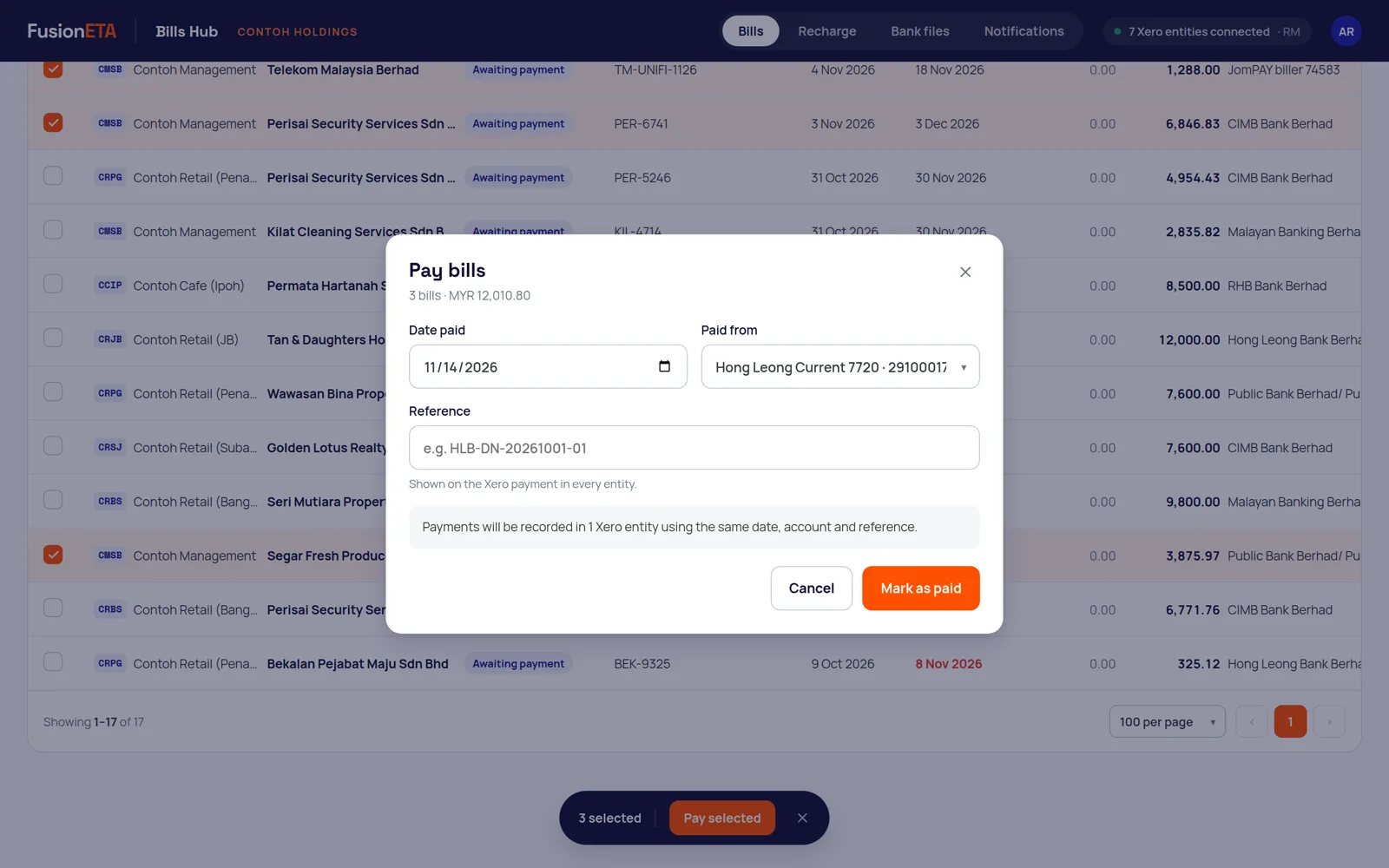
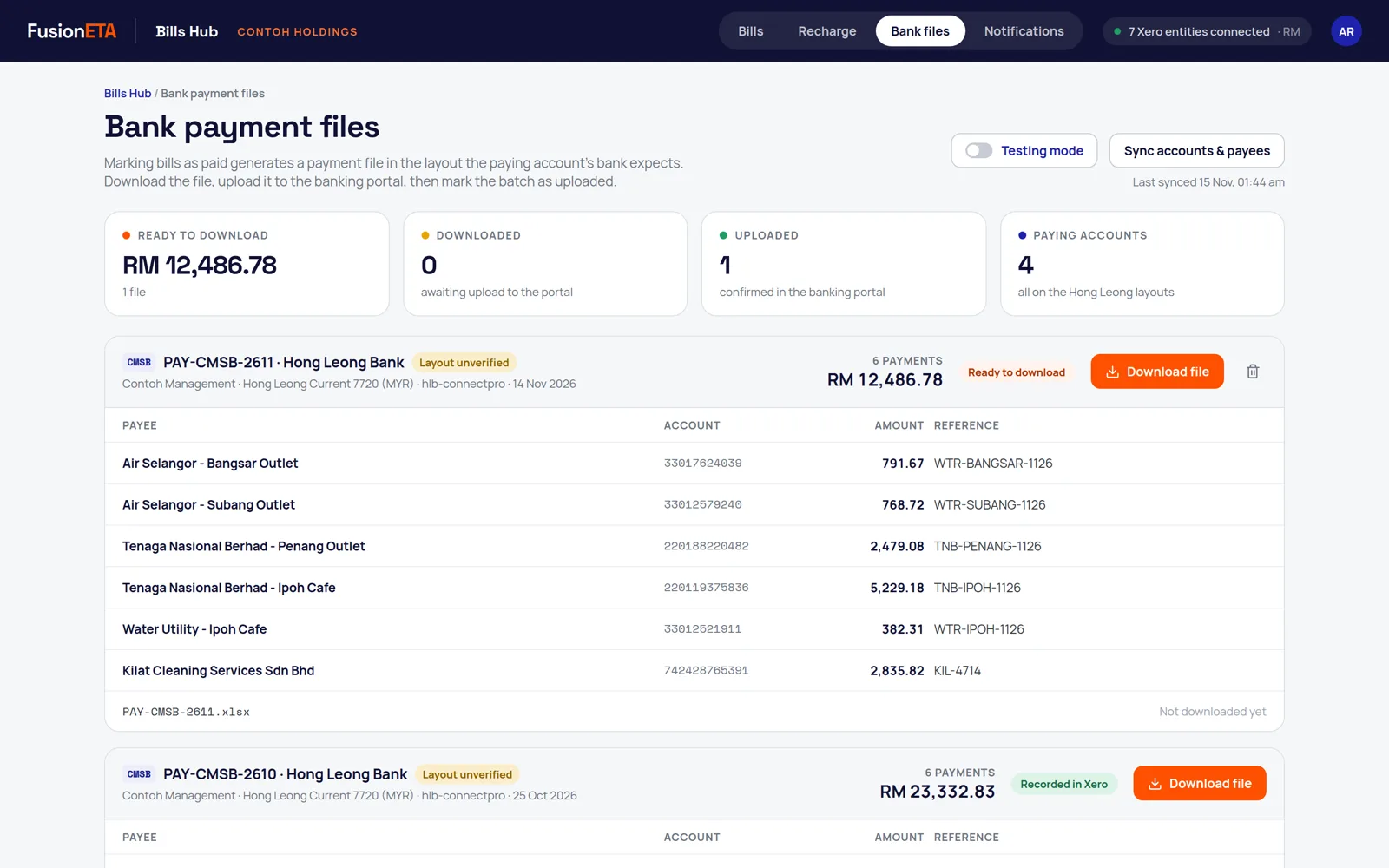
Select approved bills and mark them paid. Bills Hub records the payment in Xero as one batch payment and produces the file your bank's business portal takes.
- CIMB BizChannel (via BizConverter) and Hong Leong ConnectPro bulk payments
- JomPay billers and bank transfers split automatically from each supplier's Xero details
- Payee bank details come straight from Xero, so nobody retypes an account number
- You still approve and release the payment in your bank
Intercompany recharges that draft themselves
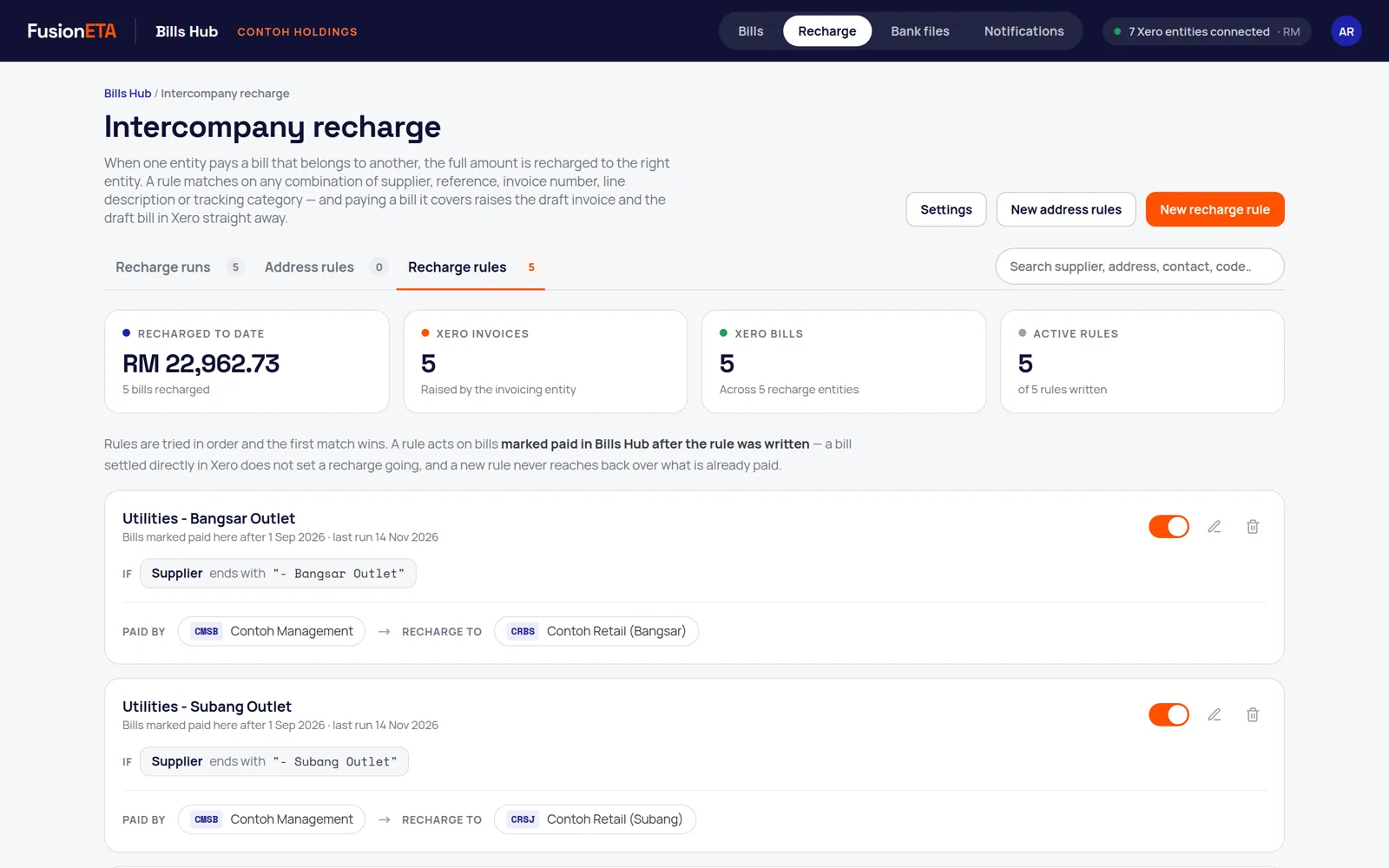
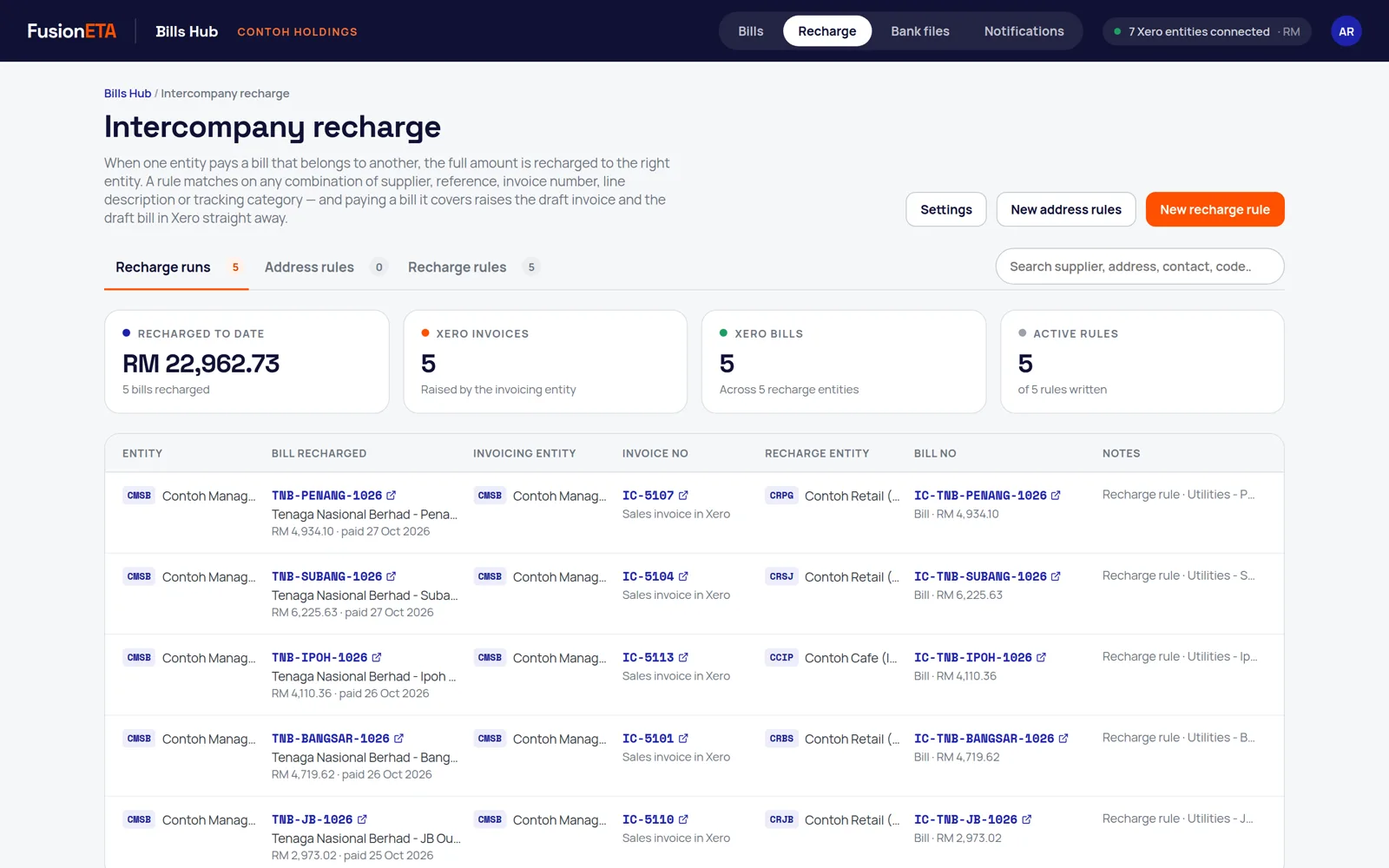
Write a rule once. When a matching bill is paid, Bills Hub raises a sales invoice in the company that paid and the matching bill in the company the cost belongs to.
- Rules match on supplier, reference, invoice number, line description or tracking category
- Same amount and reference on both sides, with the original bill's attachments copied
- Created as drafts by default, so each company approves its own
- Every recharge links to both documents in the right Xero organisation
A WhatsApp digest so nobody forgets the queue
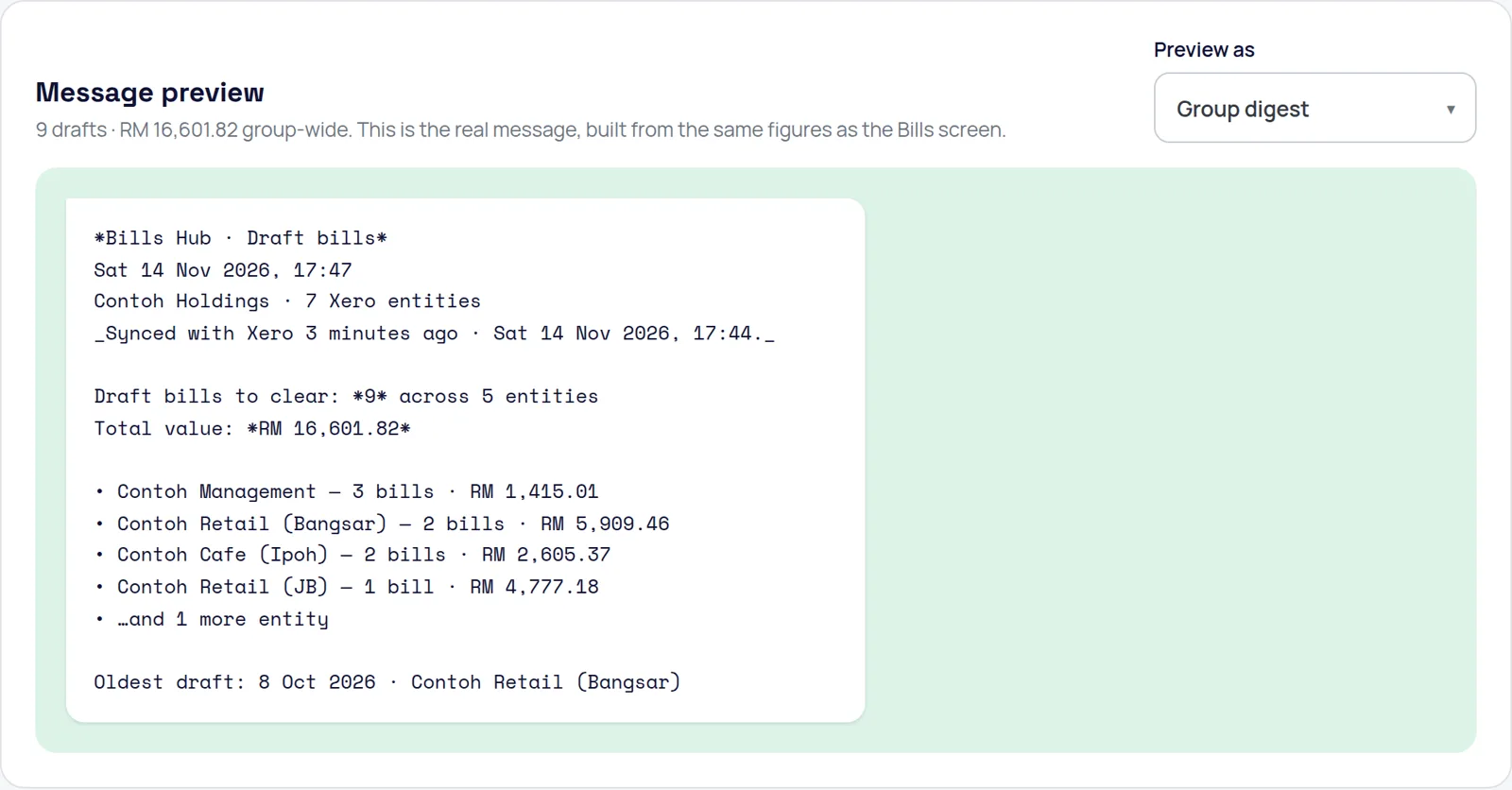
Daily, weekly or monthly at the time you choose, each person gets a WhatsApp summary of draft bills waiting: how many, how much, in which companies, and the oldest one.
- A director sees the group; an outlet accountant sees only their outlets
- Built from the same figures as the Bills screen
- Every message sent is logged with its exact text
Built to stop the mistakes that cost money
Every payment run is checked before a file is produced, and anything Bills Hub can't do safely is reported rather than guessed.
Live in days, not months
Connect Xero
One Xero sign-in connects every organisation that login can access. Bills Hub asks only for the Xero permissions it uses.
Set up payments
We add your paying bank accounts, bank file formats and supplier bank details, then run a small test payment with you.
Write recharge rules
Tell us which company pays for which, and we write the first rules with your finance team.
Approve, pay, relax
Your team works from one list, and the WhatsApp digest keeps everyone on top of the queue.
Bills Hub works alongside WazzOCR, which turns bills sent by WhatsApp or email into draft bills in the right company's Xero. Together they cover the path from a photo of a bill to a reconciled payment.
Frequently asked questions
What is Bills Hub?
Bills Hub is a web app by FusionETA that shows every supplier bill from every Xero organisation you connect in one list, so you can approve them in bulk, pay them with a bank file for CIMB, Hong Leong or JomPay, recharge costs between group companies and send a WhatsApp summary of what is waiting.
Does Bills Hub replace Xero?
No. Xero stays your accounting system. Bills Hub reads and updates bills in Xero through Xero's API and adds the cross-company view, bank payment files and intercompany recharges that Xero does not have.
Which banks does Bills Hub support?
CIMB (bulk payments and JomPay, through CIMB's BizConverter for BizChannel@CIMB, with or without email payment advice) and Hong Leong Bank (ConnectPro bulk payments and JomPay), plus a readable CSV. Other banks are added from the bank's own file specification and tested with a small payment before the first real run.
Does Bills Hub send money from my bank account?
No. Bills Hub prepares the bank file. You upload it to your bank's business portal and approve the payment there, under your bank's normal authorisation rules.
When does Bills Hub update Xero?
When you mark selected bills as paid, Bills Hub records the payment in Xero as one batch payment for that company and bank account, and produces the bank file to upload. Testing mode lets you rehearse the whole flow against live data without writing anything to Xero.
How many Xero organisations can it handle?
Bills Hub was built for a Malaysian group running more than 40 Xero organisations and works within Xero's API limits for each one. It is also useful for a single company.
Who sets it up?
FusionETA, a Xero Gold Partner in Kuala Lumpur. We connect your Xero organisations, set up your bank formats and recharge rules, run the first test payment with you and train your team.
See Bills Hub on your own Xero companies
Book a walkthrough with FusionETA, a Xero Gold Partner in Kuala Lumpur. We'll show bills, bank files and recharges against your organisations in testing mode, so nothing changes in Xero.
Screens show demo data for a fictional group. Bills Hub and WazzOCR are FusionETA products. Xero is a trademark of Xero Limited; bank names are trademarks of their owners.
 .