
How to Submit a Consolidated e-Invoice in Xero: Malaysia Guide (2026)
When you can consolidate, the RM10,000 rule, the 7-day deadline, and how to prepare, review and submit your monthly consolidated e-invoice from Xero.
If you sell to the public (walk-in customers, online shoppers, members), most of your buyers won't ask for an e-invoice. LHDN lets you combine those sales into one consolidated e-invoice per month and submit it to MyInvois. Xero prepares that consolidated e-invoice for you from the sales invoices you've tagged. Here's how it works and what to watch out for.
The short version
- Tag every sales invoice line with its MyInvois classification in Xero.
- Any single transaction above RM10,000 needs its own individual e-invoice from 1 January 2026.
- Xero prepares a draft consolidated e-invoice after month end. Review it, then submit it within 7 days after the month ends.
What is a consolidated e-invoice?
A consolidated e-invoice combines all the month's sales where the buyer didn't request an e-invoice into a single e-invoice submitted to MyInvois. It's meant for business-to-consumer sales. If a buyer does ask for an e-invoice, issue them an individual e-invoice instead and leave that sale out of the consolidated one.
When you can't consolidate
- Transactions above RM10,000. From 1 January 2026, LHDN's e-Invoice Specific Guideline does not allow a consolidated e-invoice for any single transaction exceeding RM10,000. Issue an individual e-invoice for it. The test is per transaction, not per customer or per month.
- Certain activities. LHDN does not allow consolidation for some activities, such as motor vehicle sales, flight tickets and construction contracts. Check the latest guideline for the full list.
- Buyers who request an e-invoice. They get an individual e-invoice.
Before you start
- Xero is connected to MyInvois through Invoici. If not, follow our Xero e-invoice setup guide first.
- When you connect to Invoici, Xero creates a MyInvois classification tracking category. You need a free tracking category slot for this.
- Your SST tax rates are set up correctly in Xero.
Step by step: consolidated e-invoice in Xero
Step 1: Use a general customer for walk-in sales
For buyers who don't need an e-invoice, record sales against a general customer contact (for example "General Public") rather than creating a contact for every buyer. LHDN's general public TIN is EI00000000010.
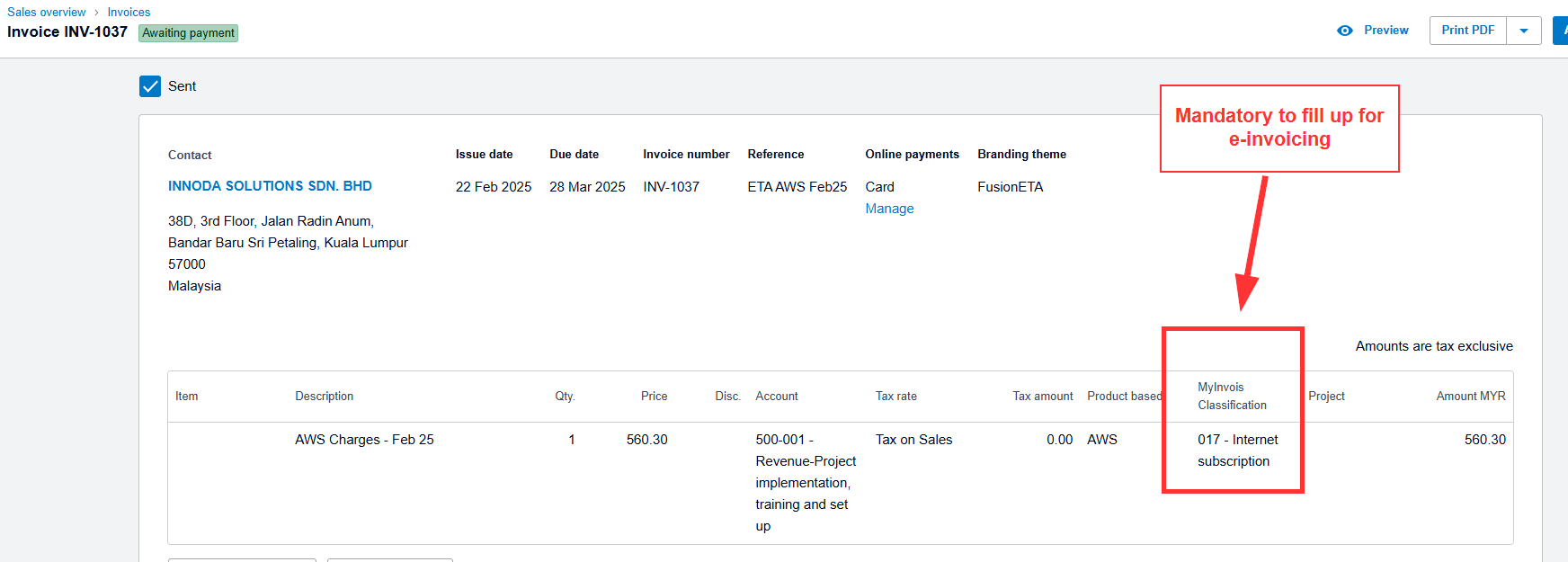
Step 2: Tag every sales invoice with its MyInvois classification
On each sales invoice line, choose the correct MyInvois classification in the tracking category Xero created. Untagged invoices are left out of the consolidated e-invoice, so check this before the month closes.
Step 3: Issue individual e-invoices where required
Before month end, find any sale above RM10,000 or any buyer who asked for an e-invoice, and send those as individual e-invoices. See how to send an e-invoice from Xero.
Step 4: Review the draft consolidated e-invoice
Early in the following month, Xero prepares a draft consolidated e-invoice from your tagged invoices (and a consolidated self-billed e-invoice, if you have self-billed transactions). Before submitting, check:
- The total matches your sales report for the month, less the sales you issued individually
- SST amounts and tax rates are right
- No single line represents a transaction above RM10,000
Step 5: Submit within 7 days after month end
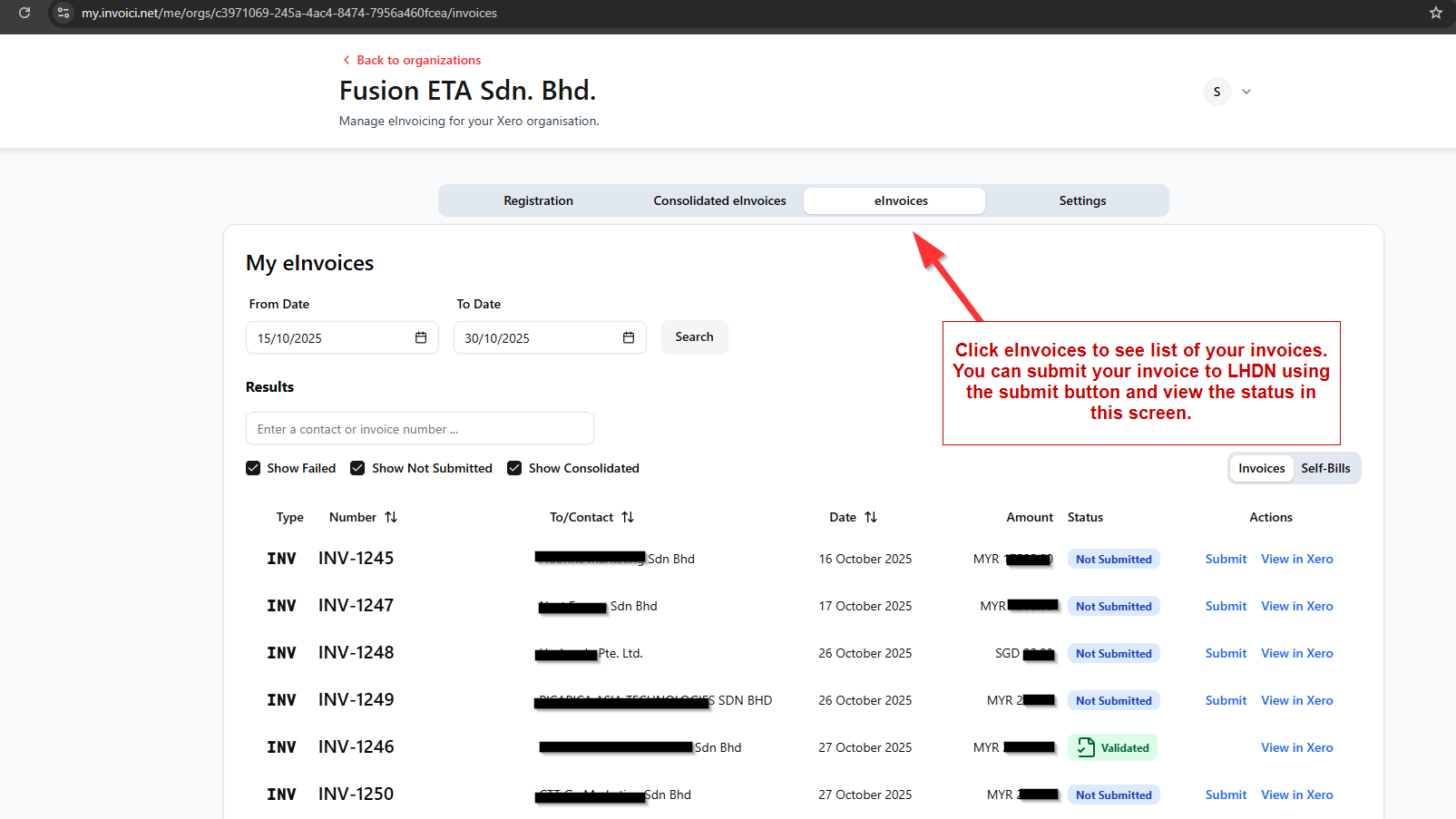
Send the consolidated e-invoice to Invoici the same way you send your other e-invoices from Xero. It must reach MyInvois within 7 days after the end of the month. For example, March 2026 sales must be submitted by 7 April 2026. Aim to submit 2–3 days early in case anything is rejected.
Step 6: Check it was validated
Track the status in the Invoici listing view at my.invoici.net, or in the invoice's History & Notes in Xero. Once validated, the MyInvois validation link is available.
Common mistakes
- Forgetting to tag invoices with a MyInvois classification, so they're missing from the consolidated e-invoice.
- Including a sale above RM10,000. It must be issued individually.
- Wrong SST rates, such as 6% instead of 8% for services.
- Totals that don't match your accounts because of manual journals or adjustments outside invoices.
- Leaving it to the last day. Rejections need time to fix.
Frequently asked questions
What is the deadline for a consolidated e-invoice?
Within 7 days after the end of the month the sales relate to.
Can I include a RM12,000 sale in my consolidated e-invoice?
No. From 1 January 2026, any single transaction exceeding RM10,000 needs an individual e-invoice.
Does Xero submit the consolidated e-invoice automatically?
Xero prepares the draft for you, but you should review it and submit it. Check Xero Central's e-invoice guide for the current process.
Do I need to consolidate self-billed e-invoices too?
Where self-billed transactions qualify for consolidation, Xero prepares a separate consolidated self-billed e-invoice for you to review and submit.
Based on LHDN's e-Invoice guidelines and Xero's Malaysia e-invoicing features as at November 2026. Rules and Xero's process can change; check LHDN's latest Specific Guideline and Xero Central before relying on this guide.
 .